Wow. It’s been a while since I’ve posted. This semester I started so many new things, like the Max Planck Honors program, working in the Max Planck machine shop, and conducting my own research project in Dr.Fields lab at FAU. There is so much to say but I will talk about all of that in a later post. Here we are talking about kicking some footballs. Techgarage has decided to participate in a football kicking competition sponsored by FPL and ESPN. The goal is to develop a robot that is capable of shooting s football into a regulation field goal from 30 feet away. We actually have multiple Techgarage teams competing each with a different design.
Our chosen design was a fly wheel shooter which uses four 16 inch wheels spinning at 5000RPM to shoot the football. The other option was to use slingshot or an arm to hit the football but we thought the fly wheel shooter would shoot it the furthest and be the most consistent. We started the project by building a sturdy GoBilda drive train that somewhat resembles what we will make for the FRC season.
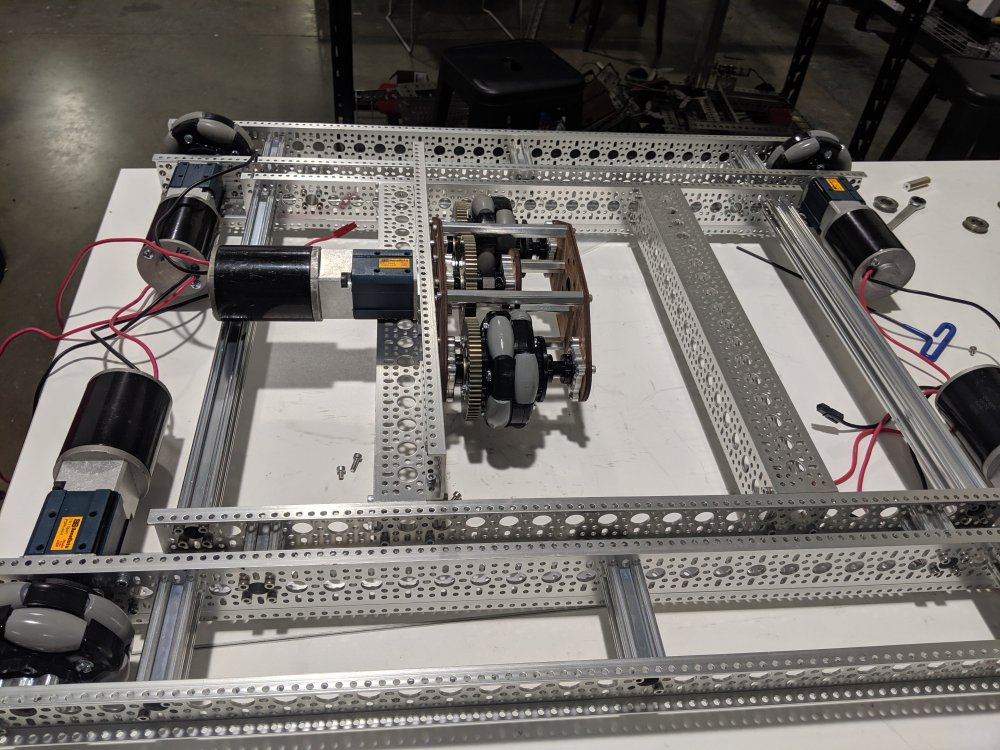
Not only is this a fun competition it is also a good prep for FRC as we have time to experiment with different drive train configurations and designs. In this case we opted for an H drive because mecanums will not work in grass. The basic premise of an H drive is that you have your four normal wheels which are all omnis and do the turning and driving. Then you have a middle wheel that is responsible for strafing and because your four other wheels are omnis and perpendicular to the center wheel the entire robot is able to roll to the side. We did a slight alteration and used a see saw design for our center Omni. This allows the center module to passively retract when it is not being used allowing us to go up ramps and limiting wear on the center wheel. It also creates a way for the wheel to dig into the ground and give more friction that you wouldn’t be able to achieve otherwise.
After mechanically assembling the drive train we added some electronics to test the strafing mechanism and it worked great!
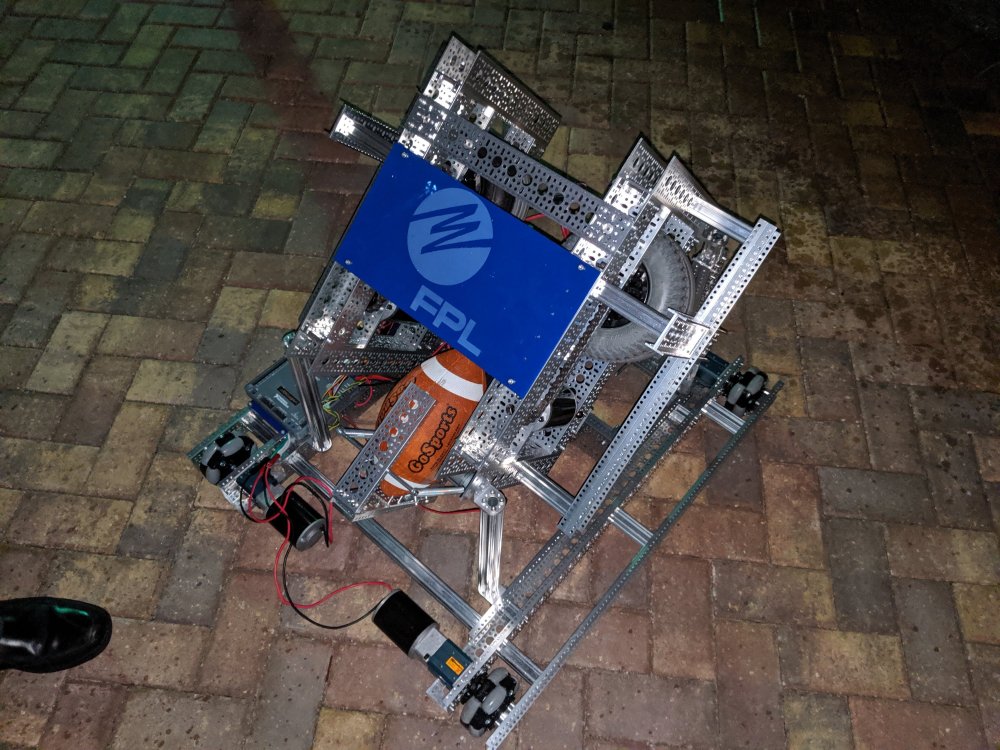
The next step was to actually work on the shooter. I had less of a role in this aspect of the project and was mainly led by Aidan Dickinson. However, I still know enough about it to talk about it. We used 4 inflatable 16 inch rubber tires two stacked on top of each other on each side. These were directly chained to a CIM motor which is capable of spinning at 5000RPM. These wheels are fairly heavy so it essential created a fly wheel shooter that would launch the ball as soon as it came in contact. All the momentum contained in the wheels would be transfered to the football sending it flying. We had some initial struggle with reinforcement as having wheels that aren’t precision centered rotating that fast can cause a significant amount of vibration. After adding more support to pretty much every part of the shooter we then loctitied every bolt to prevent the screws from vibrating loose. With this shooter not only were we capable of shooting the football 30 feet we were actually capable of shooting it 30 yards which is almost 100 feet!
With the shooter designed we mounted it to the drive train and we had ourselves a field goal kicking robot!
Knowing me though this definitely wasn’t enough. I began working on adding a Google Coral camera to the front of the robot and programming it to integrate with the FRC control system. I was able to setup a MJPEG camera stream and I lathed the FRC SmartDashboard to this URL while the coral was plugged in via Ethernet to the FRC Radio and I was actually able to get a pretty good video stream. While it worked the FRC Radio has bandwidth limitstions so while the Google coral was outputting a 40fps 640×480 resolution image. I had to downscale it to 100×100 and convert it to a grayscale image to reduce color depth. For any robotics application I believe that real-time high frame rate video is more important than high resolution color accurate video. Using the code Danny and I developed to rapidly switch and deploy AI algorithms on the Google coral we will be able to control what AI is being used from the FRC control system. Using pynetworktables we are able to write values to a variable that is accessible by the roborio and the java robot control code. Not only can we switch algorithms using this but we can present the inference from the AI to the robot code and then make decisions. For example, last night I was working on face tracking. We already have an AI on the Google coral for face tracking so we started running that and I created a face variable in the pynetworktables that I could then write the array of rectangle corner positions too. Then the roborio robot code was able to read these values and I could calculate both the size of the box and the position of the face in the frame. To make the robot follow me I needed the face to be both centered and a certain size which translates to a certain distance away. To do this I just had a simple formula. (Face Center – Frame Center)*3. I fed this value into the turn variable in our drivetrain.drive function. So if I was to far to the right it would turn to the right and vice versa. The same concept was used for staying a certain distance away. This would be much better with a PID but I haven’t had the time to learn how to use a PID and our current PID expert Alex DeCorte is out of town. However I was able to prove that the basic concept of analyzing a frame sending it to the robot and also sending the information produced by the AI is a viable option for this project in addition to it’s usefulness during FRC.
Here is the video of the robot turning and following me. We still need to capture images of a football flying through the air. Once that is done we will be able to track the football and follow it. Then hopefully we can have the robot catch it it someone throws it to the robot. If nothing else this is a cool demo that can also be used during FRC season. If you want to see videos of the robot at the competition check out my Twitter and Instagram at the bottom of my website, the competition is November 30th!

 Devin Willis