I took a little break from working on the Brooklyn Board mainly just because I am pretty busy. We decided to start a company called LearningPath that will encompass a bunch of other companies focused on everything ranging from warehouse and logistics to cleaning bathrooms and I am lead project engineer for each of these. I also got two other highschool students too start helping me with the Brooklyn Board. Sam Breslin was on the Techgarage FRC team and worked on programming the PID controller for their swerve drive so he is working on the firmware and API for controlling motors on the Brooklyn Board. Katie Heller was on the GLOW FRC team and is working on adding support for servo movement to the Brooklyn Board. In order too support both of them I had to really overhaul the firmware for both the Brooklyn and Empire for communication.
I spent a couple days programming both the Brooklyn and Empire and using what I learned from my prior code adventures I finally got something I am happy with. It allows for 1ms communication to an empire of my choice and 1ms communication back which allows for around a 500Hz communication rate between the main computer and the Brooklyn Board. It is also very well organized and to add support for different commands all you need to do is add another case statement to the switch statement I have running in the main loop. This keeps it very simple and allows anyone adding features to do it without fear of breaking anything else in the code. My communication code will also scale to work with whatever data is being sent.
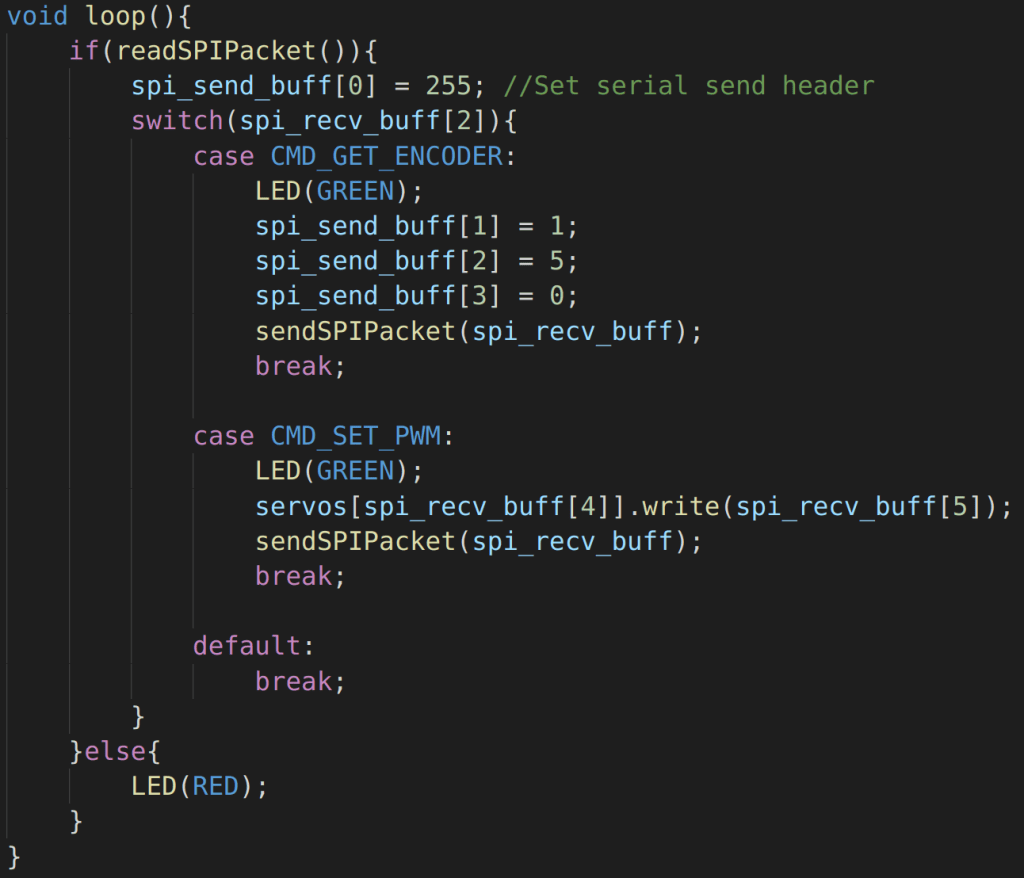
My new VSCode workflow has also helped tremendously with productivity. The VSCode IDE has a lot of tools that don’t exist in Arduino and allow for more efficient programming. being able to go to code declarations and have autocomplete just allows me to focus more on what I am trying to code rather than what I am trying to type which has also resulted in cleaner code. I have a tutorial for how to set it up you can see it here. Sam was able to follow the tutorial and said it was very easy to set it up.
While VScode makes it very easy to program it is not perfect. Actually uploading code is kind of a pain in the ass. It requires you to first upload the flashing firmware to the Brooklyn Board the upload the firmware to the Empire the reupload the firmware to the Brooklyn. This significantly slows down code iterations and makes it hard to jsut kind of test code easily and efficiently. So I made a second attempt at combining the flashing firmware with the controller firmware. I tried this once before and ran into some weird problems but now that the code is organized a bit better it could be possible.
The basic way this works is the Brooklyn starts in a idle mode waiting for a handshake from either the controller API or from the AVR programmer. I have chosen unique handshake bytes for each of these. When the controller API tries to communicate it establishes a handshake which puts the Brooklyn into controller mode and it behaves normally. However if the AVR programmer sends data it will go into programmer mode and serve as an Arduino as SPI programmer and pass through the program to the daughter cards. Another issue I encountered the first time I tried to do it was flashing all the boards at once. This time around I did a deep dive into the Arduino as SPI programmer code and saw a couple places where the Brooklyn relied on a respond from the Empire in order to flash it. This is fine but when I ask a bunch of empires the same question and they all respond you can run into timing errors and get incorrect bytes which can break the programming. Instead i needed to have a sequential programming approach for each arduino.
Now the biggest problem is that when you click upload from VSCode or the Arduino software is simply uploads to whichever Arduino is on the reset pin hard coded in the Arduino as ISP program. Rather I need to be able to program to eight different reset pins and preferably be able to specify which one I am uploading too. Arduino and VSCode both function off of AVRdude commands which there is also a terminal interface for. I still cant change the upload script directly but I can wrap it with a python script that would allow me to prime the Brooklyn prior to sending the upload command. So while the the Brooklyn is in idle mode I send my handshake byte and along with it I send the intended Reset pin for the upload. This will switch the reset pin globally in the program. This means when I run the upload program command right after this it is set to the reset pin that I specified and then it goes back to idle mode. Now if I want to do eight Arduinos I can have a for loop iterate over each reset pin but the most common use case is just programming one chip for debugging. I also designed the script so if you just upload from Arduino or VSCode it will just default to the first chip which allows you to program the cards even without the script.
Most of these changes I made to the firmware were ease of life changes but it will make programming much more enjoyable and faster which should in turn allow us to pump out features more rapidly which will benefit everyone. The next goal is to get a PID working which I cant really talk about and wont be able to since I am not the one developing it but I will write a post soon on the API side of things as I start crafting the structure for that.

 Devin Willis